• Log In
Skip to content

UW School of Medicine Academic & Learning Technologies

  • Home
  • Course Websites
    • Canvas
      • Canvas Template & Style Guide
        • Canvas Homepage
        • Modules
          • Naming Modules
          • Indenting
          • Block Overview Module
          • Block Materials and Resources Module
        • Daily Pages
          • Making a New Daily Page
          • Naming Daily Pages
          • Page Format & Parts
        • Blank Page Template
        • Canvas Navigation Tabs
      • Managing Canvas
        • Canvas Orientation
        • Gaining Access to Canvas
        • Adding Content to Canvas
        • Library Resources in Canvas
        • Canvas Quiz Basics
        • Canvas Preferences
      • Canvas Notifications and Email from Canvas
      • Canvas Guides (external)
    • CIDI in Canvas
      • Editing CIDI Based Pages
      • New CIDI Toolbar Guide
      • CIDI Switching between New and Legacy Toolbar
    • Elentra Cloud
    • Namecoach
    • TalentLMS
    • Pressbooks
      • Pressbooks in SOM
      • Pressbooks Accounts and Starting a New Book
      • Pressbook Design
      • Adding Visuals to Pressbooks
      • Add Video to a Pressbook
      • Links in Pressbooks
      • Linking to Library Resources
      • Content Sources for Pressbooks
      • Pressbook Publishing and Access
      • Pressbooks and Open Education Resources
      • Pressbooks Help
  • In-Class Tools
    • Classroom Polling
    • Poll Everywhere Basics
  • Video
    • Making Desktop Recordings
    • Zoom Web Conferencing
    • Teaching with Zoom
    • Video Conferencing
    • Video Production
    • Room Information
      • T5 Classrooms – Zoom Rooms Guides
    • Lecture Capture
    • Adding Video to Canvas
    • Remote Recording Best Practices
    • DIY Editing Best Practices
    • Remote Recording Kits
  • Design & Development
    • Electronic Resources (UW Library)
    • Copyright
      • Sources for Copyright-Free Content
      • Copyright Guide
    • Hybrid/HyFlex Sessions
    • Instructional Design
      • Principles for Teaching With Multimedia
      • Out-of-Class Materials
      • eLearning Authoring Tools
    • Presentation Best Practices
    • Course Pack Style Guide
      • Basic Page Layout
      • Fonts and Headings
      • Images, Charts, and Diagrams
      • Tables
      • Navigation and Bookmarks
    • Surveys
      • Student Technology Survey Results
      • 2019 Education Technology Evaluation
  • Assessment & Evaluation
    • EvaluationKIT
    • Gaining access to Course Evaluations & Surveys (CES)
    • Evaluation timing and results access
    • Final grade submission for UW SOM courses
  • Data

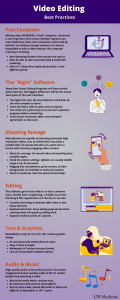
DIY Editing Best Practices

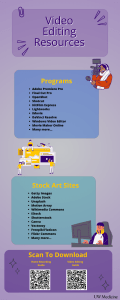
Download the SOMALT Editing Best Practices Guide here.

Video Editing Best Practices.pdf

Video Editing Best Practices.pdf


Click here for more information on desktop recording.
WWAMI_logo

Search this Site

Contact Info

Academic & Learning
Technologies

Video conferencing, Canvas, media production, classroom polling, or general questions:
somaltsupport@uw.edu

Curriculum Office
Elentra:
somcms@uw.edu

Assessment and Evaluation
Matthew Cunningham, Dept. of Biomedical Informatics & Medical Education
cunningm@uw.edu

Data requests and resources
Christen White, Assistant Director
cswhite4@uw.edu

AADM dashboard support:
aadm@uw.edu

eValue data and support:
mdsdb@uw.edu


Proudly powered by WordPress